TQL Carrier Dashboard
Total Quality Logistics, LLCMaps & Navigation
4.81.64K Reviews
- Version
- 10.1.9
- Installs
- 500.00K
- Age Rating
- Everyone
Screenshots
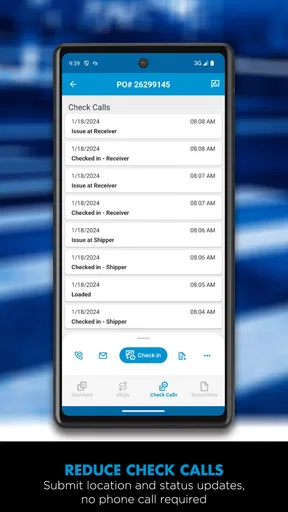
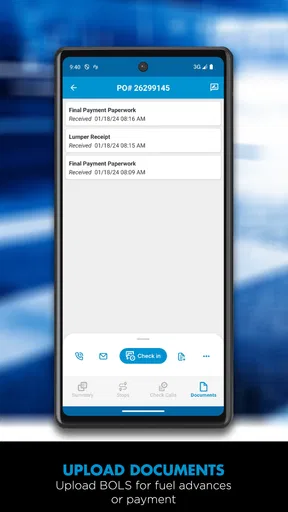
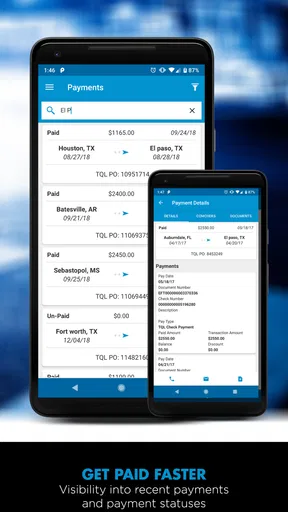
Our Review of TQL Carrier Dashboard
 Analysis by Appyee
When I look at TQL Carrier Dashboard, I see a focused tool for carriers who want to manage the practical side of finding freight and sending paperwork to Total Quality Logistics, LLC. It is not trying to be a general navigation app, a full fleet-management suite, or a replacement for every transportation workflow. Its value is narrower and more useful: putting load searching and document handling in one mobile place.
That focus is the main reason I would recommend it to an independent driver or small carrier who already works with TQL. In my experience, the best logistics apps are not necessarily the ones with the longest feature lists. They are the ones that remove a repeated interruption from the workday. Here, the likely interruption is switching between load information, camera tools, email, and other communication channels whenever a document needs to be sent or a suitable load needs to be found.
The app is free, rated for Everyone, and belongs to the Maps & Navigation category. Its current version is 10.1.9, and it requires iOS or Android 12 or later. Those details matter more than they might seem: a driver with an older phone should check compatibility before planning a workflow around it, while a newer device should have no issue meeting the stated minimum operating system.
Why the dashboard works best as a carrier’s daily workbench
I find this dashboard most useful when I treat it as a workbench for a specific slice of the day, not as the place where every carrier decision has to happen. That distinction helps me judge whether its focused load and paperwork workflow is a benefit or a constraint. From there, the next question is where that focus genuinely saves effort.
Load searching is the central reason to keep it installed
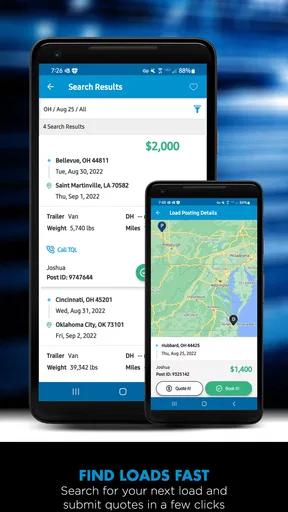
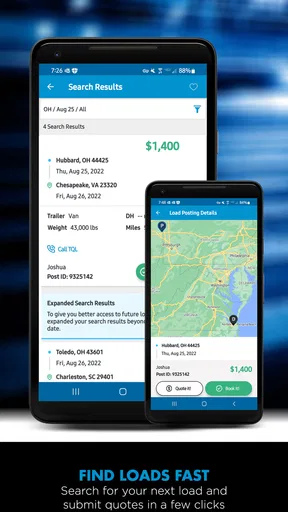
The strongest part of the experience is the relationship between searching for available loads and acting on the information quickly. A carrier does not usually browse freight as a leisure activity. The search has to support a decision: does this opportunity fit the truck, the route, the timing, and the business plan for the day?
A dedicated carrier dashboard makes more sense for that task than a general map application. A map is excellent for understanding geography, estimating a route, or checking a destination. It is not designed around the commercial question of which loads are relevant to a carrier. TQL Carrier Dashboard is more useful when the starting point is freight availability rather than a destination address.
I also like the idea of treating the phone as a compact operations desk. A driver may be parked, waiting for a facility, or between appointments rather than sitting at a computer. In those moments, a mobile dashboard can make a load search practical without requiring a separate laptop. That is a meaningful advantage for owner-operators, especially when the next decision has to be made from the cab or a loading area.
The important trade-off is that a focused dashboard is only as useful as the freight relationship behind it. If you are not looking for loads connected to TQL, the app’s purpose becomes much less compelling. Someone searching across many brokers or marketplaces may prefer a broader freight platform that combines multiple sources in one place, even if that platform feels less direct.
Document scanning is more important than it sounds
The document-scanning function is the feature I would pay closest attention to in real use. Scanning is not glamorous, but transportation work produces plenty of paperwork at exactly the moments when a driver is tired, rushed, or standing somewhere inconvenient. A phone camera that turns a paper document into something ready to submit can prevent a small administrative task from becoming a later backlog.
My practical advice would be to scan documents immediately after receiving them, while the details are still easy to associate with the correct load. Waiting until the end of a long day creates avoidable confusion, particularly when several delivery receipts or related pages look similar. The dashboard is better used as part of a repeatable habit than as an emergency filing cabinet.
There is also a subtle workflow benefit here. Keeping the search and document step close together reduces the temptation to save papers in a camera roll and promise yourself that you will organize them later. That promise is familiar to anyone who has worked from a phone: the image exists, but its purpose becomes unclear after a few hours. A carrier-focused scanning workflow gives the document a job instead of leaving it as an unnamed photo.
Still, I would not assume that scanning eliminates every paperwork concern. A clear image is not automatically a complete submission, and a driver still needs to check that all relevant pages are readable and attached to the correct transaction. The app can make capture faster, but it cannot replace careful review before sending.
The mobile format suits unpredictable transportation days
Transportation schedules rarely respect a neat office routine. A load can involve waiting, changing locations, checking details, and handling paperwork in short intervals. That makes a mobile-first dashboard more sensible than a tool that expects the user to return to a desktop for every small action.
In a realistic scenario, I might begin the morning by checking available freight, narrow the choices based on where the truck is positioned, and keep the selected information accessible while preparing for pickup. At the facility, I could use the phone to capture the paperwork rather than carrying a separate scanner. Later, after delivery, I would want the same general workflow to help me finish the document step before moving on to the next load.
That example shows the app’s strongest quality: it supports a chain of small actions that normally get scattered across different tools. It does not need to perform every transportation function to be valuable. It needs to make this particular chain less awkward.
What the adoption numbers suggest, and what they do not prove
The app has passed 500 thousand installs, with a 4.8 average from about 21 thousand ratings and roughly 1.6 thousand written reviews. Those figures suggest that it has found a substantial audience and that many users are satisfied with its practical role.
I would treat that reception as encouraging rather than conclusive. A high average can tell me that the core experience works for many people, but it cannot tell me whether the app fits a carrier with a different operating model. A driver who handles TQL freight regularly is likely to get more from it than someone who needs a universal marketplace, advanced dispatch planning, or a complete accounting system.
Small habits that make the app more useful
One useful habit is to search before the day becomes hectic, then repeat the search when the truck’s position or availability changes. Freight decisions are time-sensitive, so a result that looked suitable earlier may no longer fit after a delay. Treating the dashboard as a live work surface rather than a once-a-day notice board makes the search function more relevant.
A second tip is to prepare the phone for scanning before the paperwork arrives. A clean camera lens, enough battery, and a stable surface can make the difference between a document that is easy to read and one that needs to be captured again. This is not a special setting or hidden trick; it is simply the kind of preparation that turns a phone feature into a dependable work process.
A third insight is to separate the decision stage from the paperwork stage mentally. Finding a load and submitting documents are connected, but they are not the same task. I would first confirm that the opportunity fits the route and schedule, then scan and review documents with the same care I would give a paper packet. That separation reduces the chance of rushing the administrative part because the driving part feels more urgent.
The friction points I would consider before relying on it
The biggest limitation is scope. TQL Carrier Dashboard is not the right choice if you expect one app to coordinate every broker, compare every available option, plan a complete multi-stop route, track expenses, or replace your existing business systems. Its narrow purpose is a strength for the right user, but it becomes a constraint for anyone looking for an all-in-one carrier platform.
The dependence on a compatible operating system is another practical consideration. The minimum requirement is iOS or Android 12 or later, so an older phone may not be suitable even if it still handles calls, maps, and messaging well. For a working driver, changing phones is not always a minor expense or a convenient project. I would check the device before making this the main mobile tool.
There is also a human limitation that no dashboard can entirely remove: mobile screens are not ideal for every complex decision. A phone is convenient for quick searches and document capture, but comparing many possibilities, reviewing long details, or organizing a broader business plan may still feel easier on a larger screen. I would use the app for fast operational work and keep a larger-screen option available when the decision becomes more involved.
Another point is that convenience can encourage incomplete checking. When a tool makes scanning fast, it is tempting to tap through the process and move on. I would deliberately inspect each captured page for legibility, correct orientation, and completeness. The faster workflow is valuable only when it produces paperwork that can actually be used.
Who will get the most from it
This app is best suited to independent carriers, small fleets, and drivers who regularly deal with TQL and want a direct mobile route to load information and document handling. It is especially appealing to people who spend most of the workday away from a desk and prefer to keep operational tasks on the same device they already carry.
It may also help a small carrier create a more consistent routine. Even without a large office team, the business can have a simple sequence: review possible loads, choose the relevant opportunity, capture paperwork promptly, and keep the process moving. The app does not need to become the company’s entire technology stack to provide that kind of structure.
I would be more cautious if you are a dispatcher managing a large operation, a carrier who works mainly with other brokers, or someone who needs deep reporting and business administration. In those cases, a broader transportation-management system or multi-source load marketplace may be a better foundation. You could still find a place for this dashboard, but it would probably be a supporting tool rather than the center of the workflow.
How it compares with familiar alternatives
Compared with a standard maps app, TQL Carrier Dashboard is more relevant to the commercial side of hauling. Maps help answer where a truck can go and how it might get there; this dashboard is aimed at the earlier question of which freight opportunity deserves attention. I would not replace one with the other. They solve different parts of the day.
Compared with email and a phone camera, the dashboard has the advantage of keeping load-related actions closer together. Email can handle documents, and the camera can capture them, but that combination often leaves the user responsible for naming files, finding the correct conversation, and remembering what still needs to be sent. A dedicated workflow can reduce that mental overhead.
Compared with a broad load board, the choice depends on priority. A multi-source service is better when maximum market coverage and side-by-side comparison matter most. This app is more attractive when direct access to TQL-related work, quick searching, and document scanning matter more than gathering every possible source in one screen.
My verdict for everyday carrier use
After considering how the pieces fit together, I see TQL Carrier Dashboard as a practical specialist rather than a universal transportation solution. Its strongest case is simple: if TQL is already part of your hauling routine, the app can put load discovery and paperwork capture within easy reach of the driver.
The free price makes it straightforward to try, and the Everyone content rating keeps it accessible to the broad audience it is designed for. The developer, Total Quality Logistics, LLC, has built the experience around a specific carrier relationship rather than a generic navigation concept. That specialization is exactly why it can feel useful, but it is also why people outside that workflow may find little reason to keep it installed.
My recommendation is clear. Try it if you want a mobile workbench for TQL-related freight and you meet the operating-system requirement. Use it with a disciplined document-checking habit, and do not expect it to replace maps, broader freight marketplaces, or full business software. For the right carrier, the real advantage is fewer disconnected steps during a busy day. For everyone else, a more open and comprehensive logistics platform will probably be the better fit.
Verdict
Strengths of TQL Carrier Dashboard
- Quick access to load details, statuses, and dispatch information.
- Useful mobile visibility for drivers and carrier operations teams.
- Helps reduce calls by keeping shipment updates in one place.
- Clear workflow support for managing assigned transportation tasks.
- Convenient access while away from a desktop computer.
Limitations of TQL Carrier Dashboard
- Requires reliable internet access for current shipment information.
- Some features may be limited by user role or account permissions.
- Interface may feel less useful for carriers with few TQL loads.
- Frequent updates can be necessary to maintain compatibility.
- Performance may vary on older Android or iOS devices.
Similar Picks in This Category
View All
Uber - Request a ride
Uber Technologies, Inc.4.7


inDrive. Rides with fair fares
® SUOL INNOVATIONS LTD4.8

Yandex Go: Taxi Food Delivery
Mikromobilnost LLC Belgrade4.8

Bolt: Request a Ride
Bolt Technology4.8

Rapido: Bike-Taxi, Auto & Cabs
Rapido Bike Taxi4.8
Frequently Asked Questions
What is TQL Carrier Dashboard used for?
TQL Carrier Dashboard is designed for carriers and transportation professionals working with Total Quality Logistics. It provides a centralized way to manage freight-related tasks, review available loads, monitor shipment information, handle documents, and communicate with TQL. It can reduce the need for phone calls and separate paperwork, although the exact tools available may depend on your carrier account, permissions, and the current version of the platform.
Who can use TQL Carrier Dashboard?
The dashboard is primarily intended for approved carriers, trucking companies, dispatchers, and other authorized transportation partners working with TQL. It is not generally a consumer freight-booking app for anyone to use without registration. Before downloading, you should have valid carrier credentials or confirm that your company is eligible to create an account. Access to specific loads and features may vary according to your company profile and authorization level.
Can I find and manage loads through the app?
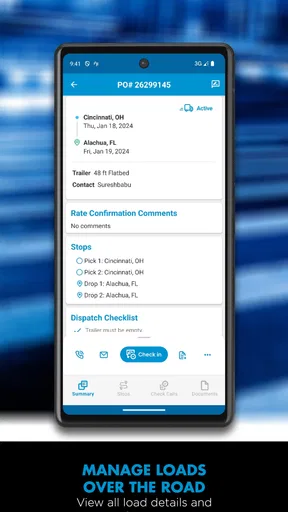
A key purpose of TQL Carrier Dashboard is to help authorized users work with freight opportunities and manage booked shipments. Depending on the account and available features, you may be able to search or review loads, see pickup and delivery details, update shipment status, and communicate relevant information. Load visibility, booking options, and management functions can change, so users should verify current availability after signing in.
Does TQL Carrier Dashboard support documents and payment-related tasks?
The platform may allow carriers to submit or review operational documents connected with shipments, such as confirmations, delivery paperwork, or other required records. Some users may also find information related to paperwork processing or payment status, but the exact options depend on TQL procedures, account permissions, and app updates. It is best to keep original documents and follow TQL’s official instructions for billing and document submission.
Is TQL Carrier Dashboard free, and what should I check before installing it?
The application is generally intended to be used by authorized TQL carrier partners rather than purchased as a conventional consumer app. Before installing, check that you are downloading the official version from a legitimate Android or iOS store, review the requested permissions, and confirm that your device meets the requirements. Also make sure your login details are ready, since many dashboard functions may remain unavailable without an active carrier account.
